
Using the Shell Node
The Shell node allows you to run terminal commands and scripts in Caido workflows.
Shell Node Editor
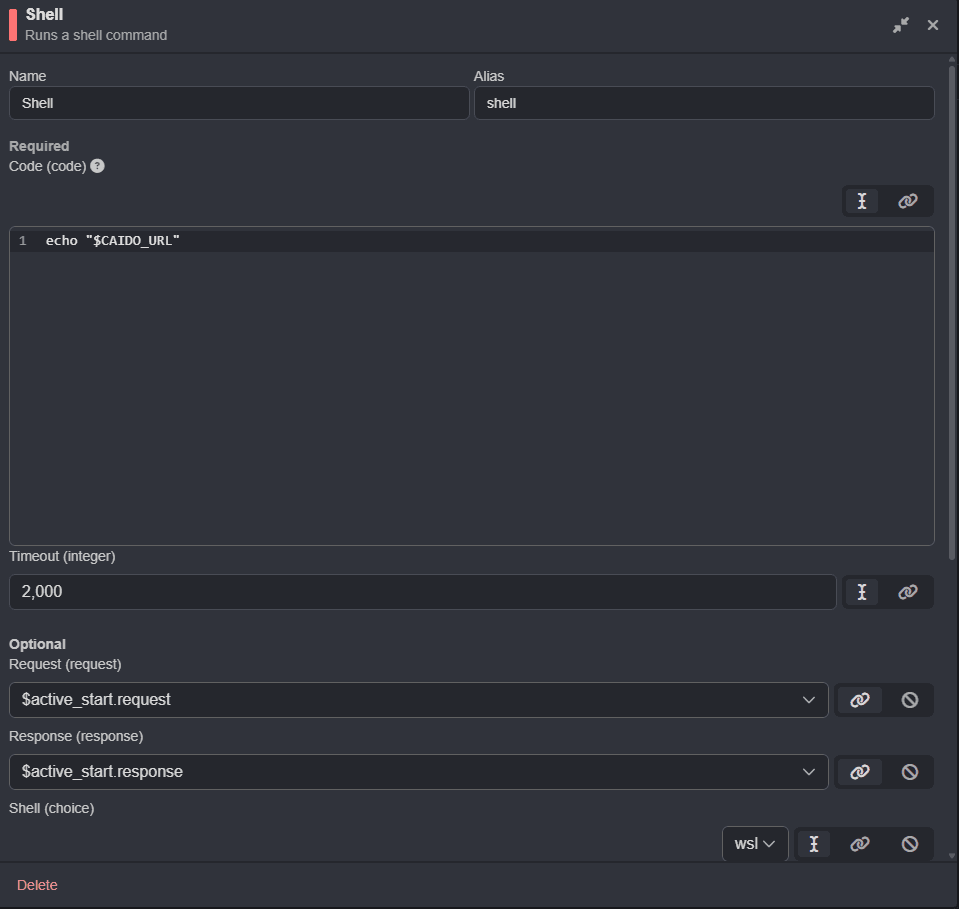
To select the terminal to use, click on the drop-down menu in the Shell (choice) section of the editor.

TIP
Use echo $SHELL to determine the appropriate selection.
The Shell node editor provides two coding environments:
Code (code): The runtime commands/script with access to Caido provided data.Init (code): The optional initialization commands/script to execute before runtime (such as creating nonexistent directories to save files to).
NOTE
By default, Init (code) sources from configuration files (.bashrc/.zshrc) to provide custom PATH variables and aliases.

Input
The data made available to your terminal can either be:
- The input data for convert workflows.
- Environment variables or Base64 encoded request and response JSON object properties for passive/active workflows.
TIP
View the Passing Data Between Nodes guide to learn how to use the output of a workflow node as the input of a connected downstream node.
Testing/Debugging Shell Node Workflows
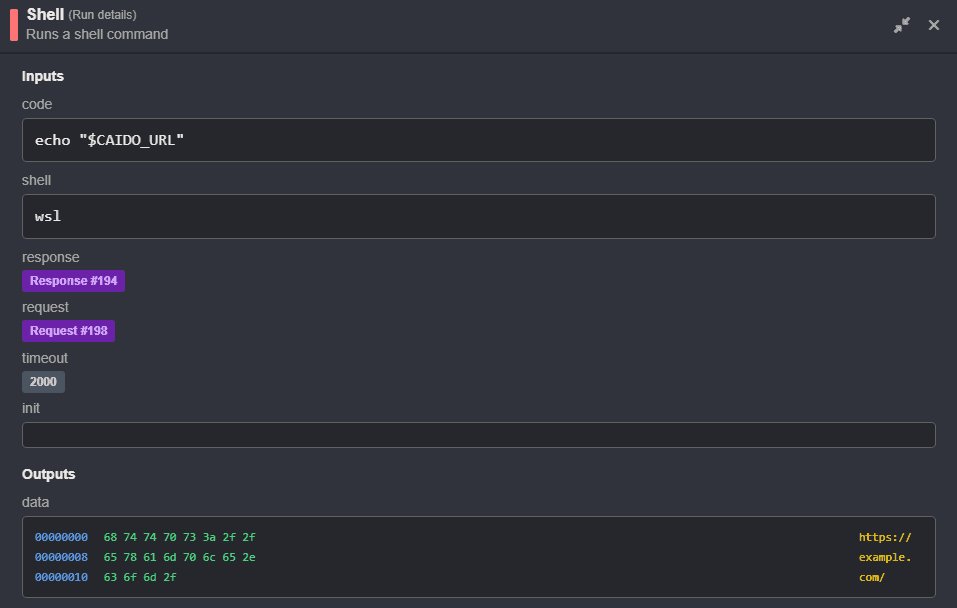
To test the execution and debug your Shell node commands/scripts before using workflows against targets, provide mock requests and responses in the editors, and click on the Run button.
TIP
Monitor the logs when debugging.

The details of each run will be listed in the View drop-down menu. To view the execution details of the Shell node, click on its associated button.
Convert Workflows
To convert data, run terminal commands/scripts against the input data.

Base64 Encoding
powershell -Command "$data = [Console]::In.ReadToEnd(); [Convert]::ToBase64String([Text.Encoding]::UTF8.GetBytes($data.TrimEnd()))"$data = [Console]::In.ReadToEnd(); [Convert]::ToBase64String([Text.Encoding]::UTF8.GetBytes($data.TrimEnd()))cat - | base64cat - | base64cat - | base64cat - | base64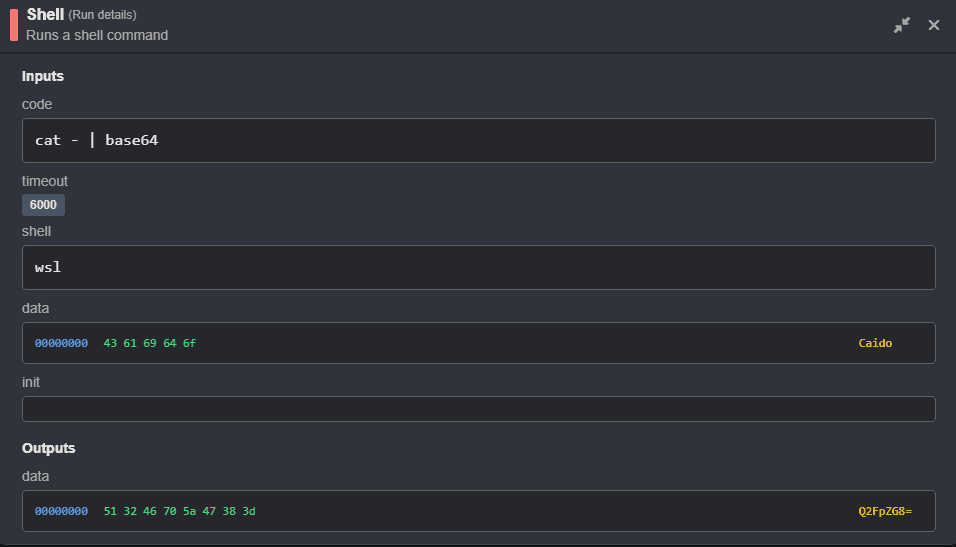
Passive/Active Workflows
Environment Variables
Request URLs, headers, and the working project name are available via environment variables.
URL to File
echo %CAIDO_URL% > %USERPROFILE%\url.txt$env:CAIDO_URL | Out-File -FilePath "$HOME\url.txt"echo "$CAIDO_URL" > ~/url.txtecho "$CAIDO_URL" > ~/url.txtecho "$CAIDO_URL" > ~/url.txtecho "$CAIDO_URL" > ~/url.txtProject Name to File
echo %CAIDO_PROJECT% > %USERPROFILE%\project.txt$env:CAIDO_PROJECT | Out-File -FilePath "$HOME\project.txt"echo "$CAIDO_PROJECT" > ~/project.txtecho "$CAIDO_PROJECT" > ~/project.txtecho "$CAIDO_PROJECT" > ~/project.txtecho "$CAIDO_PROJECT" > ~/project.txtSpecific Header to File
echo %CAIDO_REQUEST_HEADER__HOST% > %USERPROFILE%\host.txt$env:CAIDO_REQUEST_HEADER__HOST | Out-File -FilePath "$HOME\host.txt"echo "$CAIDO_REQUEST_HEADER__HOST" > ~/host.txtecho "$CAIDO_REQUEST_HEADER__HOST" > ~/host.txtecho "$CAIDO_REQUEST_HEADER__HOST" > ~/host.txtecho "$CAIDO_REQUEST_HEADER__HOST" > ~/host.txtAll Headers to File
set | findstr "CAIDO_REQUEST_HEADER__" > %USERPROFILE%\headers.txtGet-ChildItem env: | Where-Object {$_.Name -like "CAIDO_REQUEST_HEADER__*"} | ForEach-Object { "$($_.Name)=$($_.Value)" } | Out-File -FilePath "$HOME\headers.txt"env | grep "^CAIDO_REQUEST_HEADER__" > ~/headers.txtenv | while IFS='=' read -r name value; do
if [[ "$name" == CAIDO_REQUEST_HEADER__* ]]; then
echo "$name=$value"
fi
done > ~/Desktop/formatted-headers.txtenv | grep "^CAIDO_REQUEST_HEADER__" > ~/headers.txtenv | grep "^CAIDO_REQUEST_HEADER__" > ~/headers.txtAll Headers to File Formatted
set | findstr "CAIDO_REQUEST_HEADER__" > %USERPROFILE%\headers.txtGet-ChildItem env: | Where-Object {$_.Name -like "CAIDO_REQUEST_HEADER__*"} | ForEach-Object {
$name = $_.Name -replace '^CAIDO_REQUEST_HEADER__', '' -replace '_', '-'
$name = (Get-Culture).TextInfo.ToTitleCase($name.ToLower())
"${name}: $($_.Value)"
} | Out-File -FilePath "$HOME\formatted-headers.txt"title_case() { echo "$1" | awk -F'-' '{
for(i=1; i<=NF; i++) {
$i = toupper(substr($i,1,1)) tolower(substr($i,2))
}
print $0
}' | tr ' ' '-'
}
env | grep "^CAIDO_REQUEST_HEADER__" | while IFS='=' read -r name value; do
case "$name" in
CAIDO_REQUEST_HEADER__*)
header=$(echo "$name" | sed 's/^CAIDO_REQUEST_HEADER__//' | tr '_' '-' | tr '[:upper:]' '[:lower:]')
formatted_header=$(title_case "$header")
echo "$formatted_header: $value"
;;
esac
done > ~/Desktop/formatted-headers.txttitle_case() { echo "$1" | awk -F'-' '{
for(i=1; i<=NF; i++) {
$i = toupper(substr($i,1,1)) tolower(substr($i,2))
}
print $0
}' | tr ' ' '-'
}
env | grep "^CAIDO_REQUEST_HEADER__" | while IFS='=' read -r name value; do
header=$(echo "$name" | sed 's/^CAIDO_REQUEST_HEADER__//' | tr '_' '-' | tr '[:upper:]' '[:lower:]')
formatted_header=$(title_case "$header")
echo "$formatted_header: $value"
done > ~/Desktop/formatted-headers.txtenv | grep "^CAIDO_REQUEST_HEADER__" | while IFS='=' read -r name value; do
header="${name#CAIDO_REQUEST_HEADER__}"
header="${header//_/-}"
header=$(echo "$header" | tr '[:upper:]' '[:lower:]' | sed 's/\b\(.\)/\U\1/g')
echo "$header: $value"
done > ~/formatted-headers.txtenv | grep "^CAIDO_REQUEST_HEADER__" | while IFS='=' read -r name value; do
header="${name#CAIDO_REQUEST_HEADER__}"
header="${header//_/-}"
header=$(echo "$header" | tr '[:upper:]' '[:lower:]' | sed 's/\b\(.\)/\U\1/g')
echo "$header: $value"
done > ~/formatted-headers.txtRunning a Tool Against a Domain
nslookup %CAIDO_REQUEST_HEADER__HOST% > "%USERPROFILE%\nslookup.txt" 2>&1nslookup $env:CAIDO_REQUEST_HEADER__HOST | Out-File -FilePath "$HOME\nslookup.txt"nslookup $CAIDO_REQUEST_HEADER__HOST > $HOME/nslookup.txtnslookup $CAIDO_REQUEST_HEADER__HOST > ~/nslookup.txtnslookup $CAIDO_REQUEST_HEADER__HOST > ~/nslookup.txtnslookup $CAIDO_REQUEST_HEADER__HOST > ~/nslookup.txtEnumerating Subdomains
%USERPROFILE%\go\bin\subfinder.exe -d %CAIDO_REQUEST_HEADER__HOST% -o %USERPROFILE%\subs.txt& "$HOME\go\bin\subfinder.exe" -d $env:CAIDO_REQUEST_HEADER__HOST -o "$HOME\subs.txt"~/go/bin/subfinder -d "$CAIDO_REQUEST_HEADER__HOST" -o ~/subs.txt~/go/bin/subfinder -d "$CAIDO_REQUEST_HEADER__HOST" -o ~/subs.txt~/go/bin/subfinder -d "$CAIDO_REQUEST_HEADER__HOST" -o ~/subs.txt~/go/bin/subfinder -d "$CAIDO_REQUEST_HEADER__HOST" -o ~/subs.txtRequests & Responses
Raw requests and responses are available as a JSON object via STDIN.


NOTE
The request and response JSON parameter data is Base64 encoded.
- For cmd, use
powershell -Commandto execute PowerShell commands. - For powershell, use the built-in
ConvertFrom-Jsoncmdlet (no installation needed). - For bash/zsh/sh/wsl, install jq to parse JSON.
Request to File
powershell -Command "$json = [Console]::In.ReadToEnd() | ConvertFrom-Json; [System.Text.Encoding]::UTF8.GetString([System.Convert]::FromBase64String($json.request)) | Out-File -FilePath \"$env:USERPROFILE\request.txt\""$json = $input | ConvertFrom-Json
[System.Text.Encoding]::UTF8.GetString([System.Convert]::FromBase64String($json.request)) | Out-File -FilePath "$HOME\request.txt"cat - | jq -r .request | base64 -d > ~/request.txtcat - | jq -r .request | base64 -d > ~/request.txtcat - | jq -r .request | base64 -d > ~/request.txtcat - | jq -r .request | base64 -d > ~/request.txtRequest Headers to File
powershell -Command "$json = [Console]::In.ReadToEnd() | ConvertFrom-Json; $decoded = [System.Text.Encoding]::UTF8.GetString([System.Convert]::FromBase64String($json.request)); $lines = $decoded -split \"`r`n\"; $lines[1..($lines.IndexOf('')-1)] | Out-File -FilePath \"$env:USERPROFILE\request-headers.txt\""$json = $input | ConvertFrom-Json
$decoded = [System.Text.Encoding]::UTF8.GetString([System.Convert]::FromBase64String($json.request))
$lines = $decoded -split "`r`n"
$lines[1..($lines.IndexOf("")-1)] | Out-File -FilePath "$HOME\request-headers.txt"cat - | jq -r .request | base64 -d | sed -n '2,/^\r$/p' | sed '/^\r$/d' > ~/request-headers.txtcat - | jq -r .request | base64 -d | sed -n '2,/^\r$/p' | sed '/^\r$/d' > ~/request-headers.txtcat - | jq -r .request | base64 -d | sed -n '2,/^\r$/p' | sed '/^\r$/d' > ~/request-headers.txtcat - | jq -r .request | base64 -d | sed -n '2,/^\r$/p' | sed '/^\r$/d' > ~/request-headers.txtResponse to File
powershell -Command "$json = [Console]::In.ReadToEnd() | ConvertFrom-Json; [System.Text.Encoding]::UTF8.GetString([System.Convert]::FromBase64String($json.response)) | Out-File -FilePath \"$env:USERPROFILE\response.txt\""$json = $input | ConvertFrom-Json
[System.Text.Encoding]::UTF8.GetString([System.Convert]::FromBase64String($json.response)) | Out-File -FilePath "$HOME\response.txt"cat - | jq -r .response | base64 -d > ~/response.txtcat - | jq -r .response | base64 -d > ~/response.txtcat - | jq -r .response | base64 -d > ~/response.txtcat - | jq -r .response | base64 -d > ~/response.txtResponse Headers to File
powershell -Command "$json = [Console]::In.ReadToEnd() | ConvertFrom-Json; $decoded = [System.Text.Encoding]::UTF8.GetString([System.Convert]::FromBase64String($json.response)); $lines = $decoded -split \"`r`n\"; $lines[1..($lines.IndexOf('')-1)] | Out-File -FilePath \"$env:USERPROFILE\response-headers.txt\""$json = $input | ConvertFrom-Json
$decoded = [System.Text.Encoding]::UTF8.GetString([System.Convert]::FromBase64String($json.response))
$lines = $decoded -split "`r`n"
$lines[1..($lines.IndexOf("")-1)] | Out-File -FilePath "$HOME\response-headers.txt"cat - | jq -r .response | base64 -d | sed -n '2,/^\r$/p' | sed '/^\r$/d' > ~/response-headers.txtcat - | jq -r .response | base64 -d | sed -n '2,/^\r$/p' | sed '/^\r$/d' > ~/response-headers.txtcat - | jq -r .response | base64 -d | sed -n '2,/^\r$/p' | sed '/^\r$/d' > ~/response-headers.txtcat - | jq -r .response | base64 -d | sed -n '2,/^\r$/p' | sed '/^\r$/d' > ~/response-headers.txtResponse Body to File
powershell -Command "$json = [Console]::In.ReadToEnd() | ConvertFrom-Json; $decoded = [System.Text.Encoding]::UTF8.GetString([System.Convert]::FromBase64String($json.response)); $bodyStart = $decoded.IndexOf(\"`r`n`r`n\") + 4; $body = $decoded.Substring($bodyStart); $body | Out-File -FilePath \"$env:USERPROFILE\response-body.txt\""$json = $input | ConvertFrom-Json
$decoded = [System.Text.Encoding]::UTF8.GetString([System.Convert]::FromBase64String($json.response))
$bodyStart = $decoded.IndexOf("`r`n`r`n") + 4
$body = $decoded.Substring($bodyStart)
$body | Out-File -FilePath "$HOME\response-body.txt"cat - | jq -r .response | base64 -d | sed -n '2,/^\r$/p' | sed '/^\r$/d' > ~/response-headers.txtcat - | jq -r .response | base64 -d | sed '1,/^\r$/d' > ~/response-body.txtcat - | jq -r .response | base64 -d | sed '1,/^\r$/d' > ~/response-body.txtcat - | jq -r .request | base64 -d > ~/request.txt